Interface
Minimal. Focused. Fast.
ミニマルで集中できるUI
A clean popup that gets the job done in seconds.
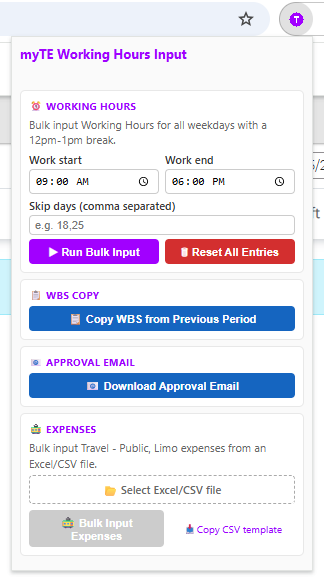
English
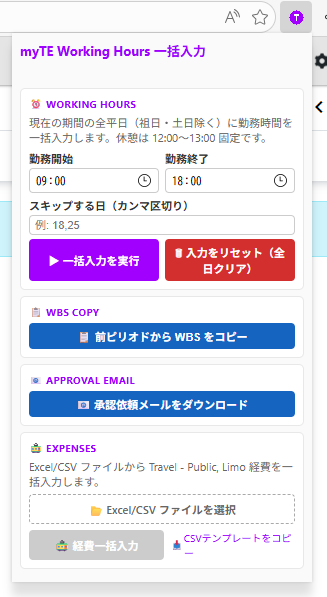
日本語
myTE 勤務時間の一括入力ツール
Stop wasting time on repetitive entries. Fill working hours and expenses for your entire period in seconds.
Interface
ミニマルで集中できるUI
A clean popup that gets the job done in seconds.
Features
必要な機能だけをシンプルに
Purpose-built to eliminate the tedious parts of myTE time entry.
Fill working hours for all weekdays in the current period instantly. Weekends and holidays are automatically skipped — no more clicking through each day.
Set your own start/end times. Lunch break (12:00–13:00) is auto-applied.
Specify days to skip — vacation, sick days, or any custom dates.
Clear all entries for the period and start fresh with one click.
Automatically copy WBS charge codes from the previous period. No need to re-enter project codes every time a new period starts.
Import public transport expenses from a CSV/Excel file and fill the expense form automatically — dates, amounts, locations, and charge codes.
Capture a screenshot of your myTE page and download a ready-to-send approval request email (.eml) with the screenshot attached.
Full English & Japanese support, auto-detected from your browser.
How it works
たった3ステップ
From opening myTE to done in under 10 seconds.
Navigate to myte.accenture.com and open the Time page for your period.
Click the icon in your toolbar. Set your hours and days to skip.
Hit "Run Bulk Input" — all weekday entries fill automatically. Done.
| Time | Activity |
|---|---|
| 09:00 – 12:00 | Work |
| 12:00 – 13:00 | Lunch Break |
| 13:00 – 18:00 | Work |
Install
今すぐインストール
Available on Chrome Web Store and Edge Add-ons.
Works with any Chromium-based browser
毎ピリオド10分のムダをなくそう。
Join your teammates who already automated their myTE time & expense entries.
Install Now — It's Free